Manychat Pricing 2026: Real Social Media DM Automation Cost
Manychat pricing in 2026: real cost at 250 to 25,000 Active Contacts, where the cheaper plan flips, and what its social media API leaves out.

Manychat pricing looks like four numbers on a card, and the number you actually pay is usually none of them. The plans read $17, $39, $99 and $199 a month. What decides your invoice is a meter running underneath them called Active Contacts, and the moment you pass your plan’s included pool, Manychat bills you per person on top of the sticker price.
One thing to settle before the numbers: the pricing below is Manychat’s new model, and it currently applies to accounts created on or after March 2, 2026. If your account predates that, you are still on old pricing, which is a distinction most write-ups of this keyword skip entirely.
So this post runs the meter out. What each plan includes, what actually trips the counter, what the bill comes to at 250 through 25,000 contacts, and the three points where the cheaper plan flips. If you are wiring this into an agent rather than clicking through a flow builder, skip to the API section, because the contact math is not what will constrain you.
Manychat Pricing at a Glance
Five plans: Free at $0, then Essential, Pro, Business and Advanced at $17, $39, $99 and $199 a month, or $14, $29, $69 and $139 on annual billing. The full ladder with included contacts is in the table below.
Where the product unlocks: Pro. AI, Broadcasts, WhatsApp, SMS, email and API access all start there, and nothing below it has them at any contact volume.
Free trial: 14 days, on Essential and Pro only. Business and Advanced have no trial. A card is required for any paid plan, and the free plan needs none.
The quirk that decides your bill: past your included pool you pay per additional Active Contact, at $0.10 on Essential, $0.05 on Pro, $0.025 on Business and $0.004 on Advanced. Not every competitor bills this way, and Chatfuel meters AI processing instead of contacts. That per-head rate, not the sticker price, is why two accounts with identical usage can pay six times differently: at 10,000 contacts, Essential bills $992 against Business at $161.50.
How Manychat’s Active Contact Pricing Actually Works
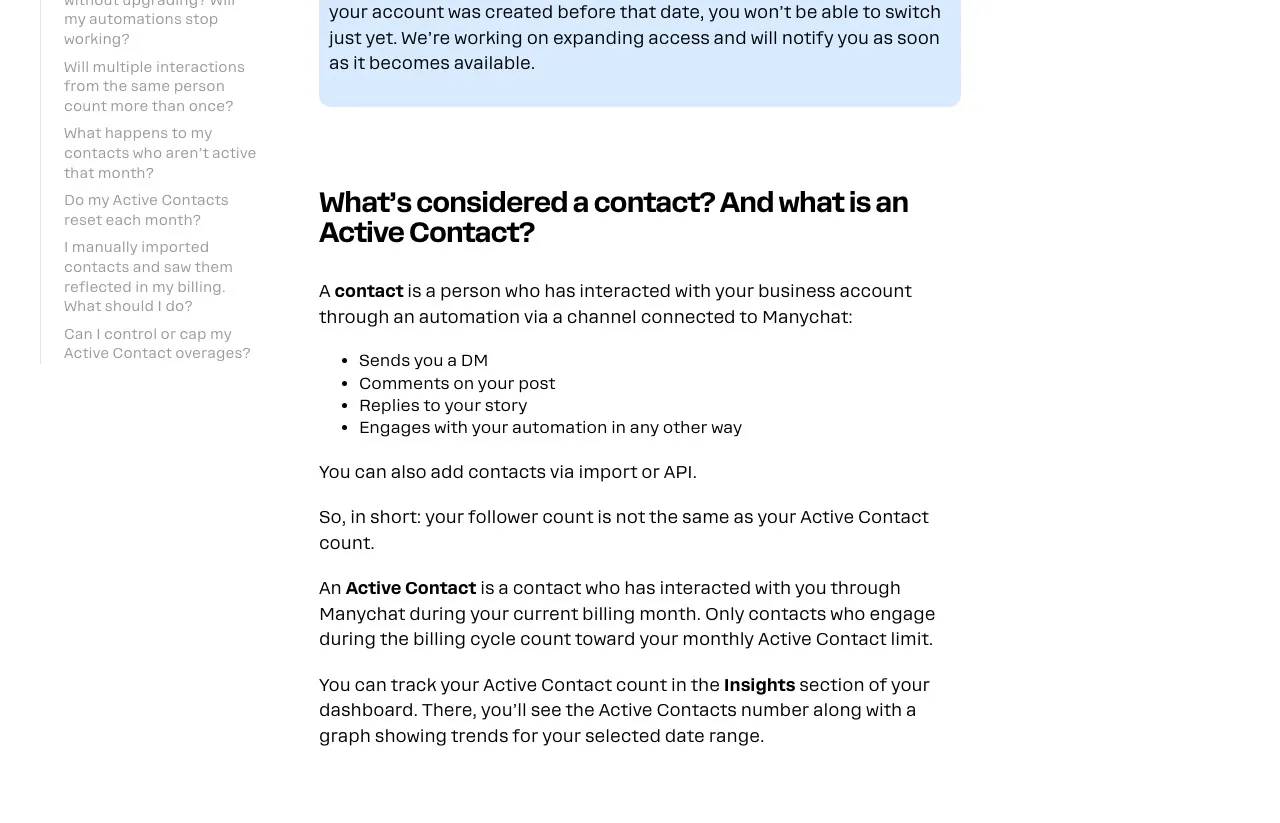
The billing unit is not a follower, a subscriber, or a conversation. Manychat counts an Active Contact as a person who interacted with your business account through an automation on a connected channel during the billing month, which covers a DM, a comment on your post, a story reply, or any other automation touch. Your follower count and your Active Contact count are unrelated numbers.
So the meter is driven by how many people your automations touch in a month, not by how many messages you send or how hard you work. Reach is the cost driver. A post that outperforms brings more people into your automations, and the invoice follows the audience rather than the effort. Followers who never message you do not count, and a person who messages fifty times counts once, so volume per person is free.
Manually imported contacts work differently. Manychat says a CSV upload does not count on its own, and those contacts become Active only if they send or receive messages through an automation, Manychat AI, Broadcasts or Live Chat during the cycle. Note what that list includes: Broadcasts and Live Chat replies consume the pool too.
The counter resets monthly, including on annual plans. Past your pool, automations keep running and overage applies automatically rather than anything switching off, which is why the first sign of a problem is usually the invoice. A DM-metered rival handles the same moment differently, stopping sends unless you hold credits, which I cover in what LinkDM charges past its cap. You can cap that in Settings, Billing, Subscription by setting an overage threshold.
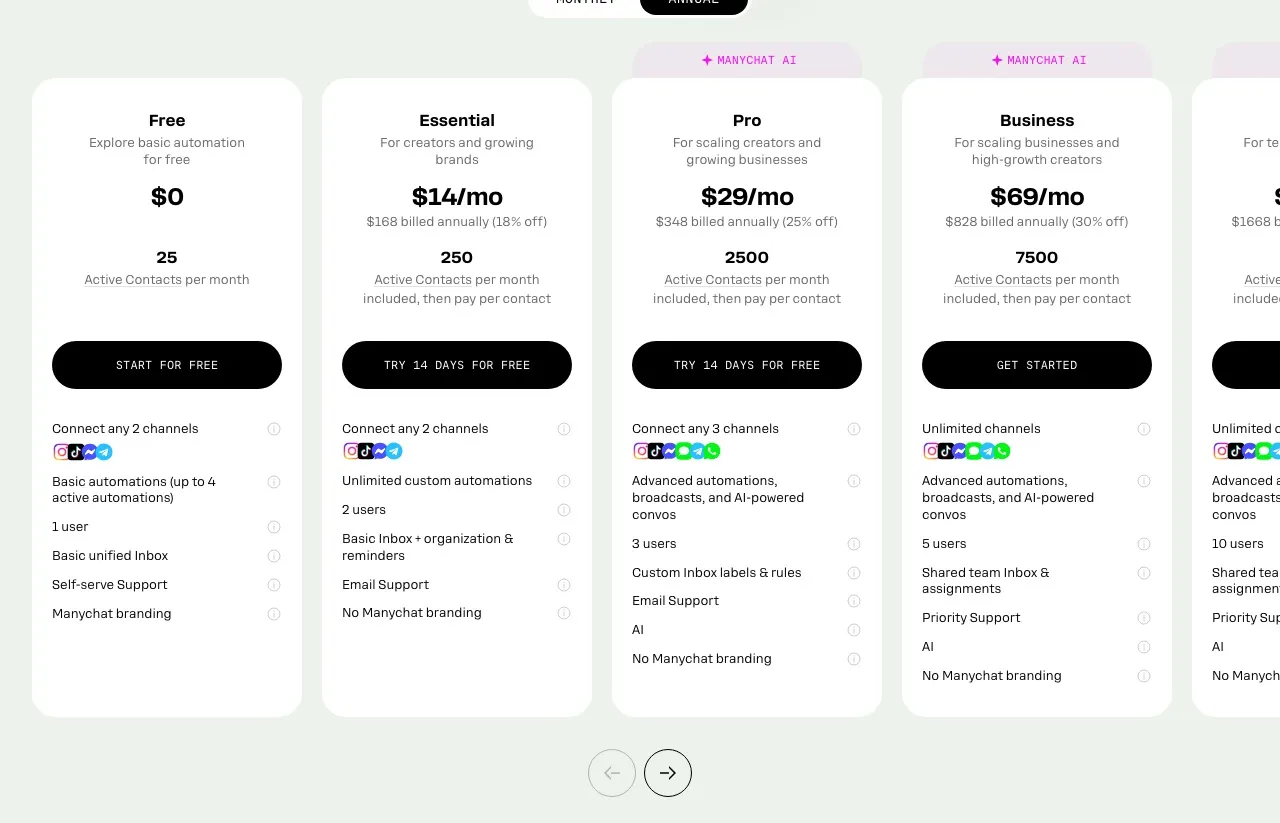
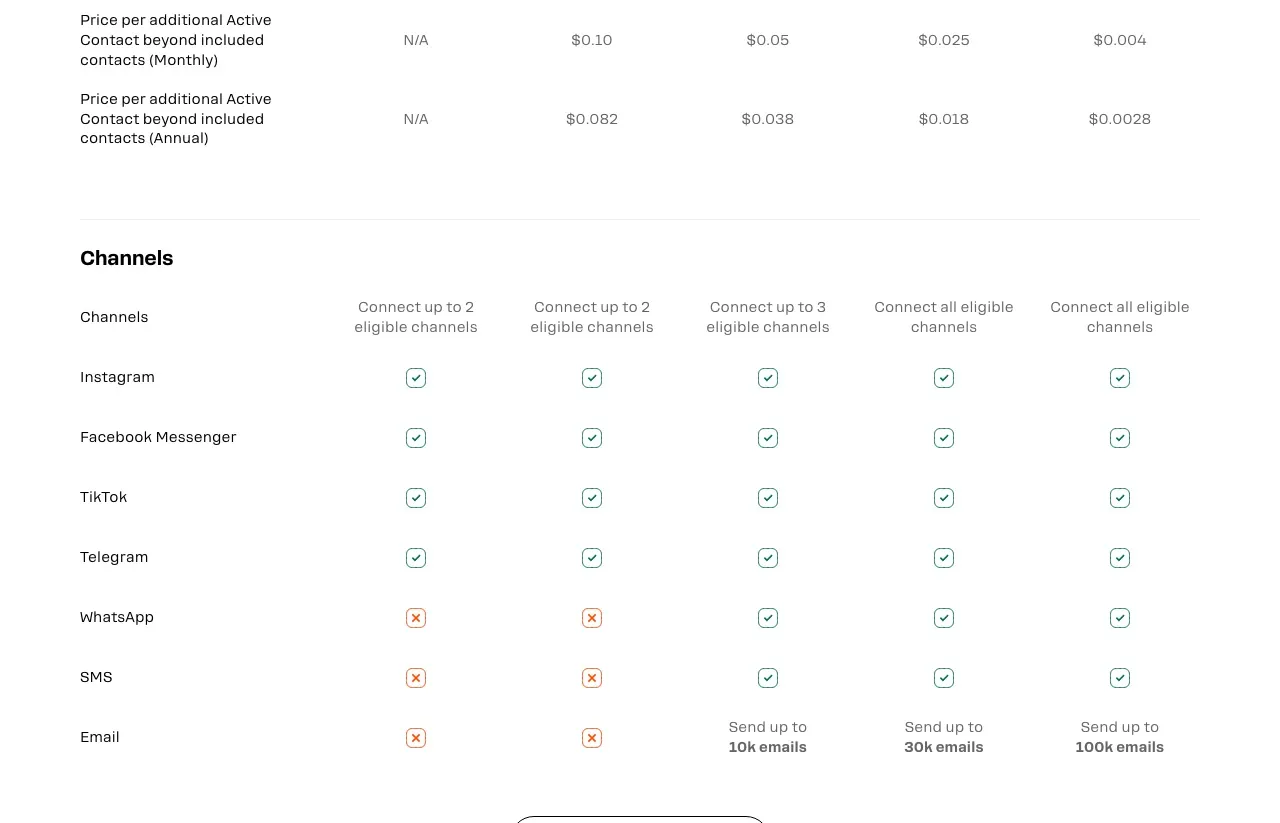
Note which toggle that page loads on. Manychat’s pricing page opens on Annual and prints the annual rate with a “/mo” suffix, so the $14, $29, $69 and $139 you see first are annual figures. Month-to-month is $17, $39, $99 and $199. Annual billing also lowers the overage rate, to $0.038 on Pro, $0.018 on Business and $0.0028 on Advanced. Essential is the one to check yourself: the plan help article says $0.08 while the comparison table on the pricing page shows $0.082.
| Plan | Monthly | Annual per month | Included Active Contacts | Overage per contact (monthly) |
|---|---|---|---|---|
| Free | $0 | $0 | 25 | not available |
| Essential | $17 | $14 | 250 | $0.10 |
| Pro | $39 | $29 | 2,500 | $0.05 |
| Business | $99 | $69 | 7,500 | $0.025 |
| Advanced | $199 | $139 | 25,000 | $0.004 |
Manychat Free Plan
The Manychat free plan is genuinely usable for testing, and genuinely small: 25 Active Contacts a month, up to 4 active automations, any 2 channels from Instagram, TikTok, Messenger or Telegram, one user, one Inbox seat, and a “Powered by Manychat” line on the first message you send each contact. No card, no time limit. WhatsApp, SMS, email, AI, Broadcasts and integrations are all gated off it.
If You Read That the Free Plan Includes 1,000 Contacts
That figure was real, and it is now two pricing models out of date. The old free tier carried 1,000 contacts. Under the model that took effect on March 2, 2026, the free plan includes 25 Active Contacts a month. Several pages currently ranking for this keyword still print the 1,000 figure, and one still lists an Elite plan that no longer appears on any Manychat surface. If a number you found does not match the plan card on Manychat’s own pricing page today, the page you read is describing the old model.
Manychat Free vs Pro
Free and Pro sit two steps apart on the ladder, so the honest comparison is not feature-by-feature. Free gives you 25 contacts, 4 automations and 2 channels. Pro at $39 a month gives you 2,500 contacts, unlimited automations, 3 channels, and the entire unlocked half of the product: Manychat AI, Broadcasts, WhatsApp, SMS, email and API access. Essential at $17 sits between them and adds unlimited automations plus the removal of the watermark, but none of the Pro feature set at any contact volume.
Is Manychat Free for Instagram
Yes. Instagram is one of the four channels the free plan can connect, alongside TikTok, Messenger and Telegram, and you can connect any two of them. Comment-to-DM on Instagram works on the free plan. The limit you will hit is the 25 Active Contacts, not the channel.
Twenty-five Active Contacts is a testing budget, not an operating one. Note what that means given the definition above: one post that outperforms can push more than 25 people into your automations and empty the pool in a day, with your setup unchanged. That, rather than a missing feature, is what pushes most people onto a paid plan.
Manychat Essential Plan
Essential is $17 a month month-to-month, or $14 on annual, and it buys you two things: unlimited custom automations and the removal of the Manychat watermark. You also get 2 users and basic Inbox organization with labels and reminders.
You are still limited to any 2 channels from the same four, so WhatsApp and SMS remain out of reach. There is no AI, no Broadcasts and no API on this tier.
The included pool is 250 Active Contacts, and this is the tier where overage bites hardest at $0.10 per contact. Essential is priced for someone running a small, predictable funnel. Push real volume through it and see the master table below, because the math turns quickly.
Manychat Pro Plan
Pro at $39 a month ($29 annual) is where most of the product actually unlocks. It adds Manychat AI, Broadcasts, WhatsApp, SMS and email, API access, custom Inbox labels and rules, 3 users and 2 Inbox seats.
The included pool jumps tenfold to 2,500 Active Contacts and the overage rate halves to $0.05.
Note the constraint the tier jump hides: Pro connects up to 3 channels of the seven, and only Business and Advanced connect them all. Running Instagram, Messenger, WhatsApp and TikTok together needs Business regardless of your contact volume.
Manychat AI is where the pricing page and the help center stop agreeing. The pricing page badges Pro, Business and Advanced with Manychat AI and publishes no AI credit pool or per-use rate, and the Pro plan article lists AI-powered automation among what the plan allows. The AI help articles are looser: they ask for “an active paid plan” without naming a tier, still call it an “add-on,” and describe the AI feature being “enabled on your account,” which reads like an entitlement. Manychat also warns that “some features may not be available on all plans,” and AI Comments is flagged as available “only for the Instagram channel.” If AI is why you are picking a tier, confirm it on your own subscription page rather than from the pricing card.
Manychat Business and Advanced Plans
Business at $99 a month ($69 annual) connects all channels, includes 7,500 Active Contacts, drops overage to $0.025, and adds a shared team Inbox with assignments, 5 users, 3 Inbox seats and priority support.
Advanced at $199 a month ($139 annual) includes 25,000 Active Contacts, cuts overage to $0.004, and raises the ceiling to 10 users and 5 Inbox seats.
Neither tier offers a free trial, so plan any evaluation around the free plan. Extra Inbox seats cost $25 each on Pro and above, up to 3 seats on Pro, 5 on Business and 10 on Advanced.
The Real Cost at 250 to 25,000 Active Contacts
This is the table the sticker prices hide. Every figure is month-to-month billing, with overage applied at each plan’s published rate.
| Active Contacts | Essential | Pro | Business | Advanced |
|---|---|---|---|---|
| 250 | $17 | $39 | $99 | $199 |
| 1,000 | $92 | $39 | $99 | $199 |
| 2,500 | $242 | $39 | $99 | $199 |
| 5,000 | $492 | $164 | $99 | $199 |
| 10,000 | $992 | $414 | $161.50 | $199 |
| 25,000 | $2,492 | $1,164 | $536.50 | $199 |
Read the rows, not the columns. At 10,000 contacts, the cheapest path is Business at $161.50 while the same volume on Essential bills $992, which is about 6.1 times the bill for identical usage. Nothing about the work changed. Only the tier you happened to be sitting on did.
That produces three crossover points, where the cheaper plan flips:
- 470 contacts: Essential plus overage ties Pro’s flat $39, and Pro is cheaper from 471 up
- 3,700 contacts: Pro plus overage equals Business’s flat $99
- 11,500 contacts: Business plus overage equals Advanced’s flat $199
Each of those ties sits far below the next tier’s included pool. From 471 contacts you are better off on Pro, even though Pro includes 2,500 and you would be using under a fifth of it. So overage stops being a good deal long before you get anywhere near the next tier’s allowance, and that gap is where the surprise invoices live.
The March 2026 Repricing, and Whether It Applies to You
Manychat introduced this model on March 2, 2026, and nearly every page ranking for this keyword describes it as though the whole customer base moved. It has not.
Manychat’s own documentation is explicit: the Active Contact model is available to accounts created on or after March 2, 2026, and if your account was created before that date you cannot switch to it yet. Manychat’s announcement post puts it plainly for existing customers, saying nothing is changing today and that the new model is currently only available for new users, with advance notice before any change. The new plans are available globally except Brazil.
So there are two live realities. New accounts are on the tiers above. Older accounts are on legacy pricing, with a migration coming and no published date. If you are comparing your invoice against a blog post, including this one, check which model you are on first. It is also why the older rate cards still circulating are worth distrusting, which I cover under the free plan above.
What’s Not Included in Any Manychat Plan
Publishing. Manychat does not schedule or publish social posts, and there is no content calendar at any tier. Broadcast sends messages to contacts who already opted in, and the pricing page describes it as reaching your audience on WhatsApp, Telegram and Messenger. Comment-to-DM reacts to posts you published somewhere else, so Manychat sits downstream of whatever puts content in the feed. Price that second bill before you compare sticker prices, and if you were considering building the publishing half yourself, what each platform’s own API charges is the floor.
WhatsApp template fees. Charged on top of your plan, per template message delivered, deducted from the Manychat Wallet at rates that vary by country and message category.
Email past your allowance. Paid tiers carry an included email volume that scales with your plan, running to 100,000 on the top tier. Beyond it, $0.003 per email, billed in increments of 5,000.
SMS. Manychat charges nothing per message. You connect your own Twilio account and Twilio bills you directly, so your SMS cost is a Twilio question rather than a Manychat one.
A way to build automations in code. The Manychat API is Pro and above, still labeled beta, and its Page API has 34 endpoints covering pages, sending and subscribers. Two of them touch flows, and both are read-and-trigger only: getFlows lists what you built, sendFlow triggers one. There is no create, update or delete for a flow or a keyword trigger, nothing creates a post or a broadcast, and nothing returns analytics. There is no first-party MCP server either, and mcp.manychat.com/mcp redirects to a page that shows a 404. That combination matters if you meant to drive this from an agent: the automations stay hand-built in the visual editor no matter how much of the rest you script. Most of the social media MCP servers worth comparing split on that exact line: whether the server publishes, or only drafts. If the conversation half is what you actually need in code, the Instagram messaging API covers what a direct build costs you in App Review and reply windows, and Blotato exposes the same surface through comment and DM endpoints on the publishing key.
When Manychat Pricing Makes Sense (and When It Doesn’t)
When it makes sense:
- Conversations are the business, not a side effect of publishing
- You need WhatsApp, Telegram, SMS or email in the same flows, which is a genuinely wide spread
- Your volume is high and stable, where Advanced’s 25,000 included contacts for a flat $199 is the cheapest of the five plans at that level
- You are testing whether comment-to-DM works at all, in which case the free plan costs nothing
When it starts to bite:
- Your reach grows faster than your revenue does, since the meter follows people reached, not sales made
- You are sitting on a low tier with real volume, which is the six-times scenario in the table above
- You need more than 3 channels but not Business-level contact volume
- You want an agent to build and edit the automations, which the API cannot do at any tier
- You already pay for a publishing tool, making Manychat a second subscription for half the job
This is a fit question, not a quality question. Manychat is priced as a dedicated conversation platform and it is a good one. The friction shows up when conversations are one part of a job you are buying several tools to do.
Manychat Pricing vs Common Alternatives
| Tool | Cheapest paid tier | What you get at entry tier |
|---|---|---|
| Manychat Essential | $17/mo | 250 Active Contacts, 2 channels, unlimited automations, no AI or API |
| InstantDM Legend Pro | $12/mo | No per-contact meter, Instagram and Facebook DM automation, sends paced per hour |
| Inrō Pro | €12.99/mo | Active-contact billing, but only contacts you activate that month |
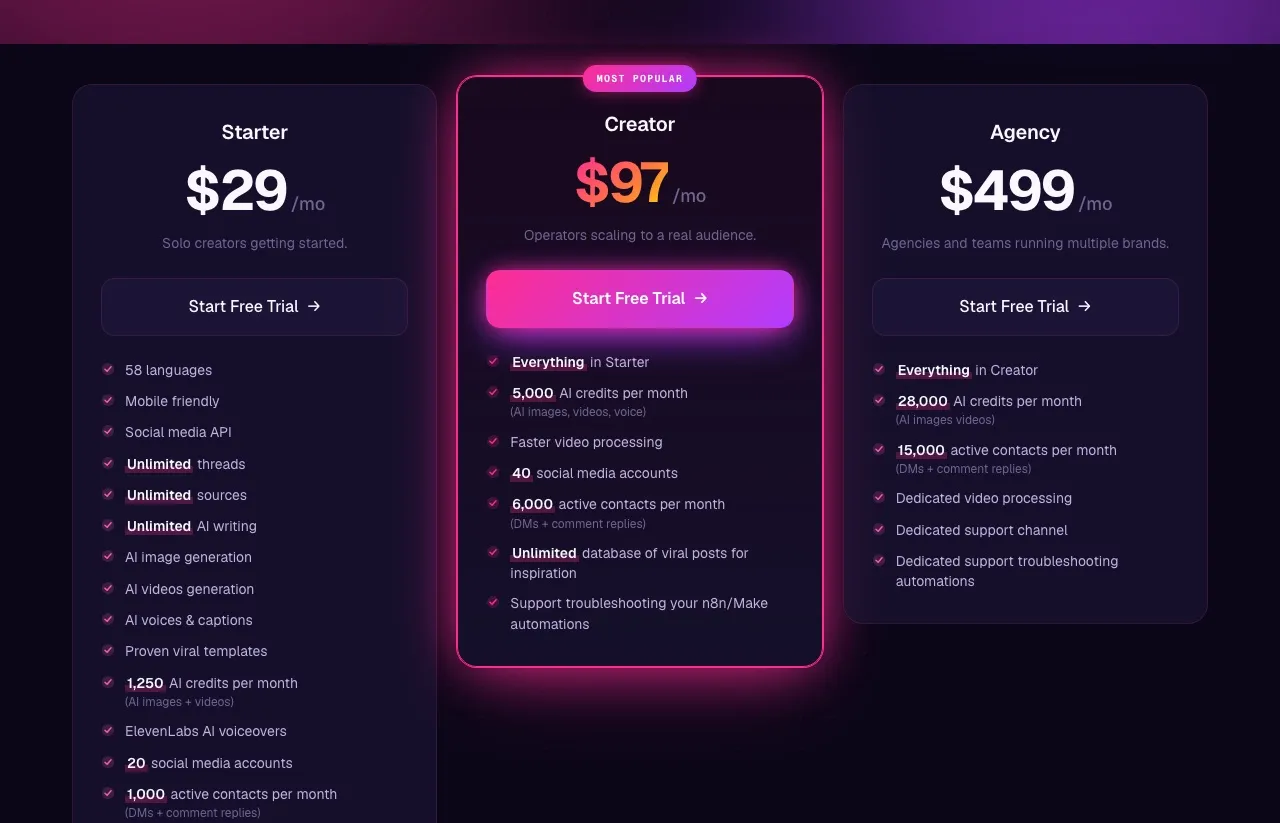
| Blotato Starter | $29/mo flat | 1,000 active contacts, publishing to 9 platforms, 20 accounts, AI image and video, API and MCP |
Manychat is strong at the top of the metered models: Advanced carries 25,000 contacts for $199. What it does not beat is a tool that removed the contact meter entirely. InstantDM bills no contacts at all from $12 a month, or $9.99 billed yearly, and paces sends by the hour instead, which I break down in InstantDM’s plan-by-plan costs. So if raw DM volume on Instagram and Facebook is all you need, the cheapest answer on this page is not Manychat.
Manychat earns its price on breadth instead, with seven channels and a shared team inbox that none of the cheap DM tools match.
Blotato’s row differs in kind rather than degree: DM automation on Instagram and Facebook sits behind the same key that publishes to nine platforms, so it replaces two subscriptions instead of being the cheaper of two. That only pays off if you were buying both. I am a creator and tester for Blotato rather than a neutral party, so here is the limit that row does not show: its DM automation runs on Instagram and Facebook only, and it replies rather than starting conversations. Manychat reaches seven channels. So the row only makes sense for someone buying both jobs at once. If something already publishes your content and your volume fits inside Pro’s 2,500 included contacts, Manychat at $39 is the better fit even though it costs more, because you would be paying for a publishing half you do not need.
For a fuller treatment of that comparison, I wrote a head-to-head on Blotato and Manychat, and if you are shopping the wider field, nine Manychat alternatives ranked by what each one bills you for covers the tools that changed the meter rather than the price.
Sabrina’s Take on Manychat Pricing in 2026
Find your row in the master table before you do anything else. Most of the billing complaints I read trace back to someone sitting two tiers below where their volume belonged, paying overage at 10 cents a head, and reading it as a price increase rather than a tier mismatch.
What I would weigh hardest is what the meter is attached to. Billing on Active Contacts means your invoice tracks your audience’s behavior, not your own usage. A post that outperforms is a cost event. That is fine when conversations are what you sell, and uncomfortable when they are a byproduct of publishing you did somewhere else.
So the decision splits three ways. Under 25 contacts a month, start free and upgrade when the pool runs dry, which happens fast. Above a few thousand with DMs as the business, go straight to the tier your volume lands in, and if you want to see what the flat-plan side looks like in practice first, building Instagram DM automations start to finish walks the whole setup. And if something already publishes your content, price the two subscriptions together before assuming the DM tool is the cheap part, which is the split I walk through in the Instagram automation tools roundup. Blotato’s plans are one way to run that comparison, alongside the DM-first tools that beat everyone on contacts alone.
Manychat Pricing FAQs
Is Manychat free?
Yes, permanently, at 25 Active Contacts a month with no card and no time limit. That is a testing budget rather than an operating one, and AI, Broadcasts, WhatsApp and SMS are all gated off it.
How much does Manychat cost per month?
Paid plans are $17, $39, $99 and $199 a month, or $14, $29, $69 and $139 on annual billing, covering 250, 2,500, 7,500 and 25,000 Active Contacts. Past your pool you pay per contact, so the sticker price is a floor rather than the bill.
What is an Active Contact in Manychat?
A contact who interacted with you through Manychat during your current billing month. Manychat defines a contact as someone who engaged with your business account through an automation on a connected channel, which covers DMs, comments on your posts, and story replies. Followers who never engage do not count, and one person messaging repeatedly counts once, so the meter tracks people reached rather than messages sent.
Why did Manychat pricing change in 2026?
Manychat introduced Active-Contact-based billing on March 2, 2026, replacing its older contact-count model. The detail most summaries skip: it currently applies only to accounts created on or after that date. Accounts created earlier remain on legacy pricing until Manychat migrates them, with advance notice promised and no published date.
Is there a cheaper alternative to Manychat?
Several, and which one is cheaper depends on what your bill is metered on. If you only need comment-to-DM, InstantDM at $12 a month, or $9.99 billed yearly, sidesteps the Active Contact meter entirely. Manychat stays cheaper than most if you need WhatsApp, Telegram and SMS in one flow builder, because the alternatives matching that channel spread cost more. The full roundup of Manychat alternatives ranks them by what each one bills you for.
Is Manychat’s Pro plan worth it?
It depends on one number rather than on the feature list. Essential plus overage ties Pro’s flat $39 at exactly 470 Active Contacts, and Pro is cheaper from 471 up, which is well under a fifth of the 2,500 Pro includes. So if you are clearing roughly 500 contacts a month, Pro is already the cheaper plan and the AI, Broadcasts, WhatsApp and API access come along at no extra cost. Below a few hundred contacts you are paying $39 for headroom you will not touch.
Do you need to pay for Manychat?
No. The free plan is permanent, needs no card, and covers 25 Active Contacts a month with up to 4 automations on any 2 of Instagram, TikTok, Messenger and Telegram. That is enough to build a comment-to-DM funnel and see whether it converts. You upgrade when the 25-contact pool runs out, which is usually the first time a post does well, rather than when you want a specific feature.
Does Manychat have a free trial?
Yes, 14 days, but only on Essential and Pro. Business and Advanced are sold without a trial, so plan an evaluation of either around the permanently free plan instead. A credit card is required for any paid plan.
Does Manychat have an API or MCP server for AI agents?
Manychat has a REST API on Pro and above, still labeled beta. Counted on its public API reference on September 23, 2026, its Page API publishes 34 endpoints, and flows are read-and-trigger only: getFlows lists them and sendFlow fires one, which I walk through endpoint by endpoint in the Manychat API guide. Nothing in the API creates, updates or deletes a flow or a keyword trigger, so the automations themselves stay hand-built in the visual editor. There is no first-party MCP server either. mcp.manychat.com/mcp redirects to a page that shows a 404. So an agent can fire an automation you already built and read your subscribers, but it cannot build or edit the automation, and it cannot publish the post that triggers it. Blotato took the other approach on DM automation, putting keyword-triggered replies on the same key that publishes, though only on Instagram and Facebook.